FLY WHERE GNSS FAILS
Unlock indoor autonomy for ArduPilot. Use your Android phone’s Network Fusion to navigate warehouses, stadiums, and urban canyons where standard GPS hardware goes blind.

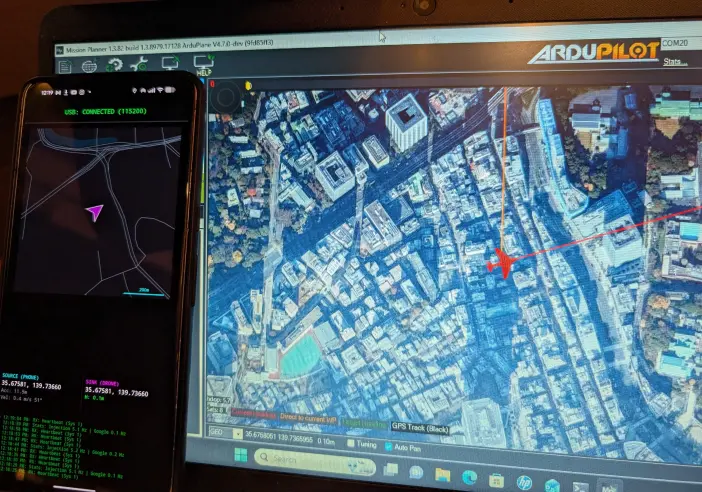
INSTANT DEPLOYMENT
Plug & Play Injection
Zero configuration required. Simply connect your Android phone to any ArduPilot or PX4 flight controller via USB. The app automatically negotiates the MAVLink handshake and begins injecting high-speed GPS packets immediately.
Fused Location Power
Harness the full might of Android's Fused Location Provider. MAVLink GPS leverages Google's global production environment to deliver enterprise-grade sensor fusion—integrating GNSS, WiFi RTT, Bluetooth Beacons, and Cell Towers—providing a rock-solid position estimate that dedicated GPS modules can't match.
Simplicity-First Indoor Flight
The most accessible path to indoor autonomy. While other systems require complex infrastructure or expensive specialized hardware, MAVLink GPS provides a remarkably simple software-first alternative. Achieve reliable position hold in stadiums, warehouses, and convention centers just by installing an app—no technical overhead required.
THE u-blox WEAKNESS
Standard GPS modules operate purely on Line-of-Sight (LoS) RF signals at 1.5 GHz. In complex environments, they fail.
Concrete Roofs
If you put a concrete roof over a standard GPS, the signal drops to zero, and the drone failsafes or drifts blindly.
Urban Canyons
Between skyscrapers, signals bounce off walls (multipath). Simple GPS chips mistake reflections for direct signals, causing wild position jumps.
Cold Boot Latency
If a drone hasn't flown recently, it needs 3–5 minutes to download Almanac data at 50 bits/sec before you can even arm.
THE NETWORK FUSION ADVANTAGE
Your phone is a supercomputer compared to a GPS chip. We leverage that power.
Concrete Penetration
Android actively triangulates position using the BSSID of surrounding WiFi Access Points and Cell Towers. Get a valid 3D fix even in stadiums and basements.
Multipath Rejection
Uses the massive processing power of Snapdragon/Tensor chips to identify and discard reflected signals, providing a "sane" position stream in cluttered urban environments.
Instant-On "Cold Boot"
Zero waiting. Your phone downloads Almanac/Ephemeris data instantly over LTE/5G (A-GPS). Go from pocket to 3D fix in milliseconds, not minutes.
EKF3 Time Rewind
We send the exact measurement timestamp to ArduPilot. The EKF3 "rewinds" its state history to apply the position correction at the exact moment it happened, eliminating lag-induced oscillation.
FIELD PROVEN
From convention centers to concrete arenas, MAVLink GPS delivers where hardware fails.

THE ANDROID ADVANTAGE
Why use a phone instead of specialized sensors? Because it's cheaper, easier, and already in your pocket.
Motion Capture / UWB
Vicon, OptiTrack, Pozyx
- $10k+ Cost
- Infrastructure Heavy
- Complex Setup
Visual Odometry
Intel T265, Oak-D, ROS
- Subject to drift without reference April tags
- Manual Tare of Pos & Azimuth
- Requires Companion PC
- Heavy Payload
MAVLink GPS
Android Network Fusion
- Zero Cost (Use your phone)
- Plug & Play (USB)
- Absolute Position (RTL)
- Zero Drift (Bounded)
WHY NOT QGROUNDCONTROL?
Existing companion software advertises GPS injection capability, but it's not what you think.
QGroundControl
QGC is designed for "Follow Me" mode outdoors. It reads Raw GPS Observables directly from the hardware.
Web Telemetry Tools
Generic telemetry apps (like Andruav) often rely on web sockets or complex server backends to relay position.
MAVLink GPS
Built specifically for the "GPS Denied" use case. We harvest the Fused Location Provider (WiFi + Cell + IMU).
FAQ
Does this work with my specific flight controller?
It works with any ArduPilot-compatible board (STM32 F4/F7/H7) that supports the MAVLink protocol. While you can technically solder a USB-to-TTL converter to a UART port to feed data, you MUST use a USB OTG cable to force the Android device into Host mode. A direct USB-C to USB-C cable will not work.
Does my phone need to be rooted?
No. MAVLink GPS operates entirely within standard Android user permissions. It requires USB Host (to talk to the drone) and Fine Location (to read the GPS/Network data), but no root access is needed.
Can I use this outdoors as a primary GPS?
Technically yes, but this isn't what the app was intended for. A dedicated U-Blox GPS puck is significantly lighter and features a tuned ceramic patch antenna that outperforms any phone GPS. This system is designed for GPS-denied environments where traditional hardware fails, not to replace standard equipment for long-range outdoor flight.
Does this work with DJI, Betaflight, or iNav?
No. This system relies specifically on the MAVLink protocol and the GPS_INPUT message to inject external position data. Betaflight and iNav use different MSP-based mechanisms that are not currently supported.
Does the app provide altitude readings?
Yes, but with caveats. In an outdoor environment with a clear view of the sky, the GPS altitude provided by the app works as expected. However, indoors, altitude readings can be poor or erratic due to the lack of vertical GNSS precision. For professional indoor flight, we strongly recommend using a dedicated Downwards Rangefinder (Lidar/Sonar) as your primary altimeter.

SIMPLE SETUP

Hardware Link
Connect your Android device to the Flight Controller using a USB-C OTG cable. Ensure your FC is powered and the USB port is configured for MAVLink.
ArduPilot Config
SERIAL0_PROTOCOL = 2 // MAVLink 2
SERIAL0_BAUD = 115 // 115200
GPS_TYPE = 14 // MAVLink
Verify & Launch
Open the app and grant USB and Location permissions. Verify 2-way connectivity to the flight controller via the USB status indicator. Finally, confirm on your Ground Control Station (GCS) that the drone's GPS position is valid and updating.
CRITICAL SAFETY WARNINGS
FOREGROUND ONLY
Do not minimize the app or turn off the screen. Android will kill the USB connection and GPS stream, triggering an immediate failsafe.
INDOOR GLITCHES
WiFi RTT location can "jump". Always keep your finger on the mode switch and be ready to flip to Stabilize instantly.